Before choosing a method, let review a few of the common methods out there.
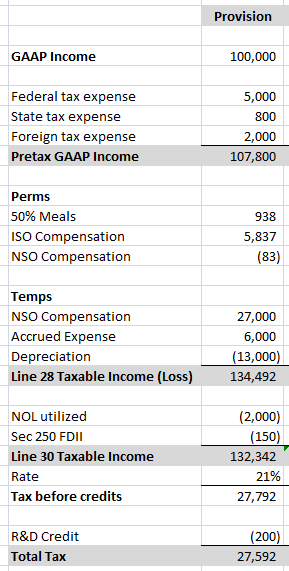
Tax Return M-1 Method – Set up similar to an M-1 reconciliation on a tax return. Start with Pre-tax GAAP income, then down the rows there is a Perm Section, then a Temp Section, then taxable income. This is the prep model I typically choose, though modified to show line 28 taxable income, then sections of credits and special deductions below (because I’m typically preparing the tax returns off of the provisions). Tax preparer modified to match line 28/line 30 method shown below.
Note: When the special items (Sec 250 FDII and GILTI, NOLs) are lumped into the perm and temp categories of the provision and line 28/line 30 are not show, you are almost guaranteed to mess up common return limitations (such as 163j Interest, Sec 250, R&D credit, etc), or forget that Sec 250 is post rather than pre-tax. Create your provision how it makes sense, but omit these important check points at your own provision peril.
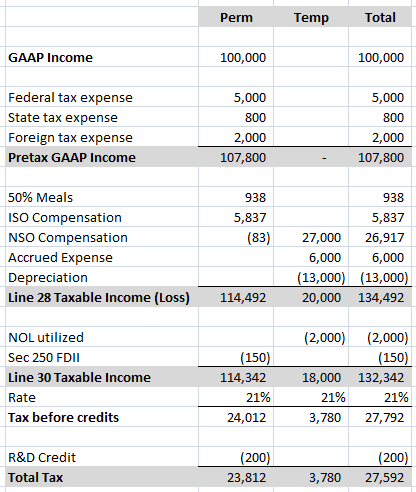
Tax Return M-3 Method – Set up similar to a M-3 reconciliation. Much like the M-1 Method above except there a columns for Perms and Temps (rather than break out on the rows). If you are not that comfortable with provisions and you can afford extra columns, this is probably the best method. When its time to perform the Rate Rec, or tie out total tax expense, the Perm column is going to be really nice!
A tax preparer could modify this with a Book and Return column and actually mimic a full M-3. But it would likely only make sense to tax preparers and no other users of the provision. And it would be brutal to create, I imagine.
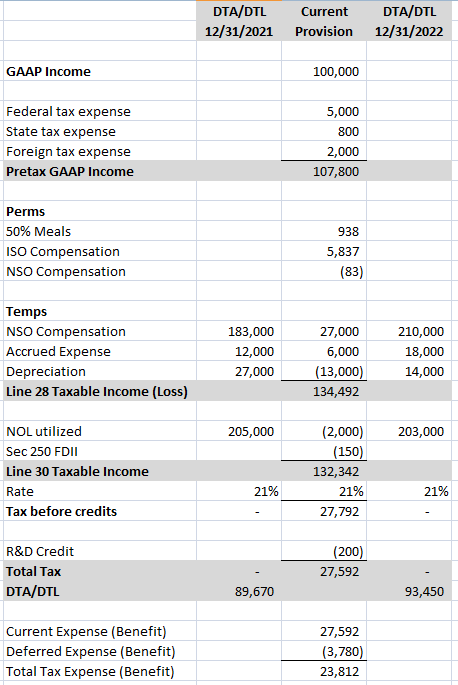
All-In-One Provision Method – Combines both the Current and Deferred Provisions. Has columns for PY DTA/DTL, then RTP (omitted below for brevity), then Adj PY DTA/DTL, then a column for the current provision calculation, then a column for CY DTA/DTL. The Current Provision runs in its own column, and Deferred Provision comprises the entirety of the workpaper by wrapping around the Current column. (The first thing I do upon opening up a provision and finding one of these is promptly taking a 30 minute break. For me, its just too much going on in one workpaper. The below looks deceptively simple by design. Add some RTPs, a state and a foreign provision next door, and you’ll see what I mean.)
Choosing a method is important, and if you stick to one template type you are bound to run into scenarios where one template type just doesn’t work if you prepare a lot of different provisions for a living.
For instance, consolidated provisions are represented nicely with side by side current provision calculations that add to a total column. This is a nightmare to do if each company has multiple columns.
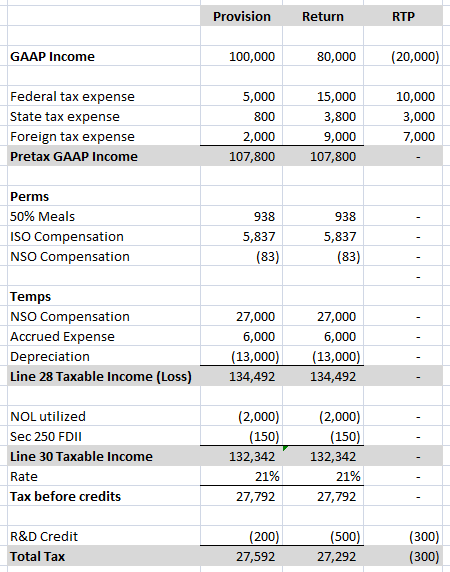
If a provision is comprised of only federal and one key state, then the luxury of additional columns makes sense. A favorite of mine it to have 3 columns per Current Provision: Provision, Tax Return, and Return to Provision. This makes using the Current Provision tab of the template as my return calculation easy, and also makes calculating the return to provision a snap to do at return time. (I am the one preparing the returns on almost all the provisions I draft). Then come next year provision, I just grab this whole tab as my RTP. The less I have to repeat work (or rekey in yet another template) the better!
Personally, I like to craft a provision new (rather than use a template) for each provision prepped. Pre-planned templates tend to be massive, as they are designed to capture all possible scenarios and cut out the need to know things. Redundant and non-matching figures abound. I prefer to be able to view all my columns in one window, and only scroll down once to see any main provision tab, which means customization.
Do not fall for the hype that a provision is too big and needs a preplanned massive template. I would argue that the larger a provision, the more simple and streamlined the provision model needs to be. The more complex a provision model, the more crevices and hidey holes there are for mistakes to lurk (even material ones).
 Tax Sophomore
Leave a comment